15296
  • LOGIN
    MUNRO- Laboratory Equipment UK
      • laboratory equipment
      • Laboratory Balances
      • Measuring Instruments
      • material testing
      1. home page
      2. BLOGS
      3. How to Use Bio-suction System for Lab?

      How to Use Bio-suction System for Lab?

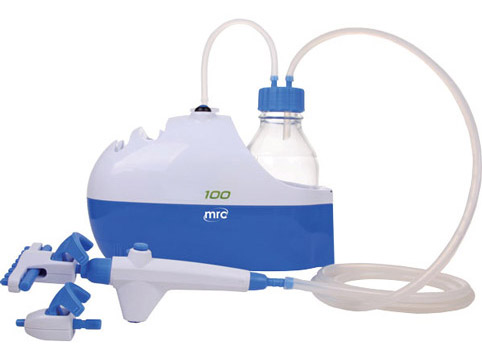
      A Bio-suction system is a piece of laboratory equipment used to safely and efficiently handle and dispose of biohazardous liquids, such as infectious samples, chemicals, or biological fluids. It operates by creating a vacuum to draw liquids into a container for containment and disposal. Here's a general guide on how to use a Bio-suction system in a laboratory setting:

      Note: Always follow your laboratory's specific protocols, safety guidelines, and equipment instructions when using a Bio-suction system.

      Safety Precautions:
      • Wear appropriate personal protective equipment (PPE), including lab coats, gloves, safety goggles, and a face shield if necessary.
      • Ensure that the Bio-suction system is properly maintained and in good working condition before use.

        Prepare the Workspace:

      • Set up your workspace in a well-ventilated area, preferably under a biological safety cabinet or fume hood to minimize exposure to biohazardous materials.

        Assemble the Bio-suction System:

      • Place the Bio-suction unit on a stable and level surface.
      • Connect the system to a power source and ensure that it's properly grounded.
      • Attach the appropriate tubing and collection container or flask to the suction port on the unit.

        Select the Appropriate Collection Container:

      • Choose a collection container that is compatible with the type and volume of the biohazardous material you will be working with.
      • Ensure that the container is labeled correctly, indicating its contents and any relevant hazard information.

        Adjust Suction Settings:

      • Depending on the model of your Bio-suction system, you may have adjustable suction settings. Set the suction strength to an appropriate level for your application, ensuring that it is not too strong to prevent spillage or damage.

        Perform the Suction:

      • Place the open end of the tubing into the biohazardous material.
      • Turn on the system, and the vacuum should draw the material into the collection container.
      • Be cautious not to overfill the container, leaving enough space for safe disposal and preventing backflow.

        Shut Down the System:

      • Once you have finished suctioning the biohazardous material, turn off the system.

        Disposal:

      • Carefully remove the collection container.
      • Seal the container securely, ensuring it's leak-proof.
      • Label the container with the appropriate biohazard labels and information required by your laboratory's safety protocols.
      • Dispose of the container following your institution's hazardous waste disposal guidelines and local regulations.

        Clean and Disinfect:

      • Thoroughly clean and disinfect all components of the Bio-suction system according to your laboratory's standard operating procedures and manufacturer's instructions.

      HOW TO USE BIO-SUCTION SYSTEM FOR LAB?

      MUNRO- Laboratory Equipment UK

      BLOGS

      ABOUT US

      ABOUT US

      CONTACT US

      CONTACT US

      SERVICE CENTER

      CENTRE

      • ABOUT
      • |
      • PRODUCTS
      • |
      • CATALOGUES
      • |
      • SUPPORT
      • |
      • CENTRE
      • |
      • CUSTOMERS
      • |
      • Privacy Policy
      • |
      • TERMS
      • |
      • FAQ
      • |
      • BLOGS

      [email protected]
      UK: Cavendish House, Parkway, Harlow Business Park, Harlow, Essex CM19 5QF UK

      • Bsmart בניית אתרים
      • SAP
      altImg

      • Fully Supported on Chromee*
      • Color Blind Adjusted
      • Heavy Vision Adjusted
      • Regular Display
      • Access Keys MenuAlt + 0
      • Stop Motion
      • Remove Underline Links
      • Press Keys For View Resize
      • Ctrl + Larger
      • Ctrl - Smaller
      • Ctrl 0 Reset Size
      • Enable Disable Keyboard Focusing
      • Reset All To Defualt

      Access Keys

      • Enable/Disable This MenuAlt + 0
      • Skip To Main MenuAlt + 1
      • Skip To Main ContentAlt + 2
      • דלג למפת אתר מונגשת Alt + Shift + 3
      • SearchAlt + 4
      • Contact PageAlt + 7
      • דלג למפת העמוד Alt+5
      • Skip To HomepageAlt + h
      • Skip To Accessibilty MenuAlt + m

      *Firefox users: Use Alt + Shiftnumber

      In order to move between elements, Press - Tabkey, To backtrack press, - Shift + Tab

    • Skip To Main Menu
    • Skip To Main Content
    • Skip To Accessbilty Menu
    • This website uses cookies for the purpose of ongoing and proper operation in accordance with the privacy policy