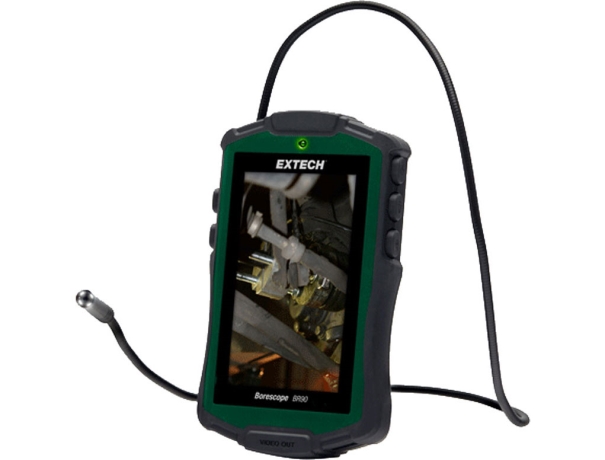
A video borescope, also known as a videoscope or an industrial endoscope, is a versatile inspection tool that allows visual examination of hard-to-reach areas. It consists of a flexible insertion tube with an attached camera, an illumination source, and a display unit. The camera captures real-time video footage or still images, enabling users to diagnose and document issues in inaccessible spaces.
Components of a Video Borescope
A video borescope comprises several essential components:
- Insertion Tube: A flexible or rigid tube that allows access to confined spaces.
- Camera: Located at the distal end of the insertion tube, it captures images and videos.
- Illumination Source: Provides adequate lighting for clear visibility during inspections.
- Display Unit: A handheld monitor or a screen connected to the borescope for viewing the captured images and videos.
- Control Panel: Enables users to adjust settings such as brightness, contrast, and zoom.
Selecting the Right Video Borescope
Consider the Inspection Environment
Before purchasing or using a video borescope, it is crucial to assess the environment in which the inspection will take place. Factors to consider include the presence of liquids, high temperatures, or potential exposure to hazardous substances. Choosing a borescope with the appropriate specifications and features ensures optimal performance and longevity.
Choosing the Appropriate Length and Diameter
Video borescopes come in various lengths and diameters. Selecting the right size depends on the target application and the dimensions of the inspection area. A longer insertion tube allows access to deeper spaces, while a narrower diameter facilitates maneuverability in tight spaces.
Evaluating Image Quality and Resolution
Image quality plays a significant role in accurate inspections. Look for video borescopes with high-resolution cameras to ensure clear and detailed visuals. High-definition (HD) or ultra-high-definition (UHD) options are recommended for intricate inspections that require precise identification of defects or anomalies.
Preparing for Inspection
Familiarizing Yourself with the Controls
Before starting an inspection, take the time to understand the controls and functionalities of the video borescope. Familiarize yourself with the buttons, knobs, and settings, ensuring you can navigate through the features effortlessly during the inspection process.
Checking Battery and Power Supply
Ensure that the video borescope's battery is fully charged or that it is connected to a stable power supply. A depleted battery can interrupt the inspection, causing unnecessary delays. Additionally, consider having spare batteries or alternative power sources on hand for extended usage.
Cleaning and Calibrating the Video Borescope
Clean the insertion tube and camera lens before each inspection to remove any debris or contaminants that may obstruct the view. Some video borescopes offer calibration features to ensure accurate measurements during inspections. Regular calibration is recommended for optimal performance.
Conducting an Inspection
Setting Up Proper Lighting
Proper lighting is crucial for obtaining clear images and videos. Position the video borescope's illumination source effectively to minimize shadows and enhance visibility. Adjust the brightness settings according to the inspection area's lighting conditions for optimal image quality.
Adjusting the Focus and Viewing Angle
Depending on the inspection requirements, you may need to adjust the focus and viewing angle of the video borescope. Use the provided controls to optimize the clarity and depth of field. Experiment with different angles and distances to obtain the most accurate and informative visuals.
Navigating through Narrow Spaces
One of the key advantages of a video borescope is its ability to access narrow and confined spaces. Utilize the flexible insertion tube to navigate through complex structures, pipes, or machinery. Slow and steady movements combined with careful manipulation can ensure effective inspection without causing damage.