Microscopes have been an essential tool in scientific research and various fields of study for centuries, enabling us to observe and study objects at the microscopic level. Digital microscopes, a modern iteration of this powerful instrument, have revolutionized the way we visualize and analyze microscopic samples. In this article, we will delve into the principle of operation of digital microscopes and explore the advantages they offer over traditional optical microscopes.
About digital microscopes in general
Digital microscopes combine the principles of traditional optical microscopy with advanced digital imaging technology. While optical microscopes use lenses to magnify and focus light to form an image, digital microscopes utilize digital sensors to capture and process images. These sensors convert the light signals into electronic signals that can be displayed on a computer screen or other digital devices.
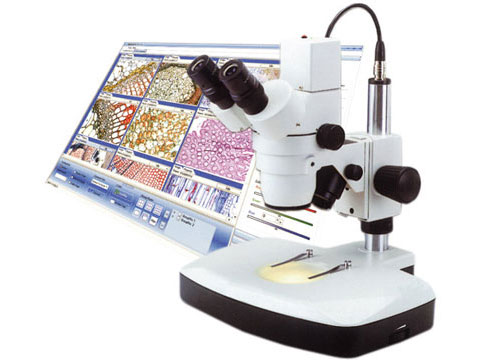
Components of Digital Microscopes
- Optics: Digital microscopes incorporate lenses and optical elements, similar to their optical counterparts, to capture light from the sample and create an initial image. These optics help focus the light and optimize the resolution and magnification.
- Digital Camera: Unlike traditional microscopes, digital microscopes have a built-in digital camera or an attachment that captures the optical image formed by the lenses. This camera can be either a CCD (charge-coupled device) or a CMOS (complementary metal-oxide-semiconductor) sensor. These sensors convert light into electrical signals, which are then processed digitally.
- Image Processor: The captured image is sent to an image processor, which enhances the image quality, adjusts the colors, and applies various filters. This processing stage allows for real-time adjustments and improvements to the image.
- Display Unit: The processed image is displayed on a connected device, such as a computer monitor, tablet, or smartphone. The digital microscope may be connected directly to the device or transmit the image wirelessly using Wi-Fi or other connectivity options.
Advantages of Digital Microscopes
- High-resolution imaging: Digital microscopes offer high-resolution imaging capabilities, enabling researchers to observe minute details that may be challenging to see with traditional optical microscopes. The digital sensors can capture more pixels, resulting in sharper and more detailed images.
- Image and data storage: They allow for the easy storage and sharing of images and data. The captured images can be saved directly to a computer or other storage devices, eliminating the need for manual documentation and making it convenient for further analysis, archiving, or sharing with colleagues.
- Real-time viewing: Users can view the sample in real time on a connected display unit. This feature is particularly useful for live demonstrations, teaching environments, or collaborative research, as it enables multiple individuals to observe and discuss the sample simultaneously.
- Advanced imaging techniques: Often come equipped with advanced imaging techniques, such as fluorescence microscopy, phase contrast, and differential interference contrast (DIC). These techniques enhance the contrast and visibility of specific sample types, making it easier to differentiate between structures and perform detailed analysis.
General operating instructions
General Operating Instructions for Digital Microscopes
They are versatile tools that provide users with the ability to observe and analyze microscopic samples with ease. To ensure proper operation and obtain accurate results, it is important to follow these general operating instructions:
Setup and Preparation:
Choose a suitable location, ensuring a stable surface and adequate lighting.
Connect the microscope to a power source if required.
If using a computer or other digital device for display, ensure it is properly connected and powered on.
Sample Preparation:
Prepare your sample according to the specific requirements of your experiment or analysis.
Ensure the sample is clean, properly mounted, and positioned securely on the microscope stage.
Adjust the focus and position of the sample as needed to obtain a clear image.
Powering On:
Turn on using the designated power button or switch.
Wait to initialize and the image to appear on the connected display device.
Adjusting Magnification and Focus:
Use the magnification controls, either physical knobs or on-screen options, to adjust the level of magnification.
Use the focus adjustment controls, typically located on the microscope body or as on-screen options, to achieve a sharp and clear image.
Make fine adjustments to the focus as necessary to observe specific details or structures.
Image Capture and Recording:
If desired, use the microscope's image capture function to save images of the observed sample.
Follow the manufacturer's instructions to activate the capture function and save the images to a connected device or storage medium.
Ensure proper labeling and documentation of captured images for future reference or analysis.
Adjusting Image Settings:
Depending on the model, you may have various image adjustment options.
Use on-screen controls or dedicated buttons to adjust brightness, contrast, color balance, and other parameters to optimize the image quality.
Experiment with different settings to achieve the desired image clarity and visibility.
Advanced Features and Techniques:
Explore and familiarize yourself with any advanced features or techniques offered by your microscope, such as fluorescence microscopy, image stitching, or measurement tools.
Consult the user manual or manufacturer's instructions to learn how to utilize these features effectively.
Powering Off and Maintenance:
When you have finished using it, turn it off using the designated power button or switch.
Disconnect from the power source if necessary.
Clean and its lenses following the manufacturer's guidelines to maintain optimal performance.