A profile projector, also known as an optical comparator, is a precision instrument designed to magnify and project the image of an object onto a screen for measurement and inspection. It is widely used in industries to analyze the dimensions and geometry of small, intricate parts with remarkable accuracy.
Profile projectors find applications in manufacturing, aerospace, automotive, and toolmaking, ensuring that components meet strict specifications.
In industries where even a fraction of a millimeter can affect performance, profile projectors provide the accuracy needed to maintain standards and reduce waste.
Key Components of a Profile Projector
Optical System
Lenses and Light Source
The optical system is the backbone of a profile projector. It includes lenses for magnification and a light source to illuminate the object, ensuring clear and detailed projections.
Screen and Magnification Features
The screen displays the magnified image, while adjustable magnification allows operators to inspect different aspects of the object with ease.
Measurement Mechanisms
Scales and Digital Readouts
Precision measurement scales and digital readouts enable accurate data collection, reducing the potential for human error.
Software Integration for Advanced Analysis
Modern come equipped with software that can process complex data, generate reports, and facilitate advanced analysis.
Profile projectors help in assessing and perfecting the designs of tools and molds, ensuring flawless production.
Advantages of Using Profile Projectors
Non-Destructive Testing
They allow for measurement without damaging the object, preserving its integrity.
Versatility in Measurement
From small screws to complex molds, They can handle a wide range of objects.
High Precision and Reliability
With their advanced optical and digital systems, profile projectors deliver unmatched accuracy.
How to Buy the Right Profile Projector
Understanding Your Measurement Needs
Assess the objects you will measure and choose a projector with suitable features.
Evaluating Key Features
Magnification and Resolution
Higher magnification and resolution are crucial for detailed inspections.
Data Integration Capabilities
Ensure the projector supports software integration for enhanced analysis.
Budget Considerations
Balance your needs with the available budget to select the best value option.
How to use Profile Projector
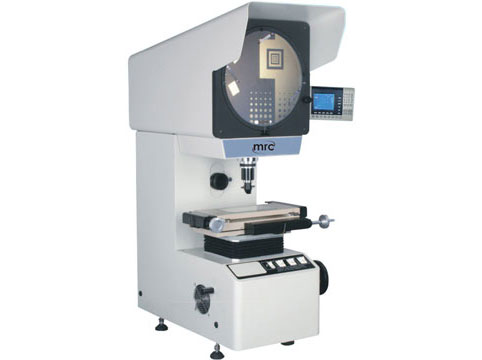
How to Use Profile Projector
1. Setup and Calibration
- Power On: Switch on the profile projector and the light source.
- Calibrate: Use a calibration standard (such as a glass scale or reference part) to ensure the machine is properly calibrated.
- Set the Magnification: Select the appropriate lens magnification (e.g., 10x, 20x, etc.) depending on the detail required.
2. Place the Component
- Clean the Component: Ensure the component to be measured is free of dust and debris.
- Position on the Stage: Place the component securely on the work stage (glass stage) and align it to the desired orientation.
- Adjust Holders (if available): Use clamps or holders if needed to keep the part stable.
3. Focus the Image
- Adjust the Stage: Move the stage using the X and Y micrometer screws to center the part under the light source.
- Focus Knob: Rotate the focus knob until the image appears sharp on the projection screen.
4. Align the Part
- Orientation: Align the part on the screen so its features match the orientation of the measurement axis.
- Protractor Use (if applicable): Use the protractor scale for angular measurements.
5. Take Measurements
- Linear Measurements: Use the micrometer scales on the X and Y axes to measure distances or dimensions.
- Angular Measurements: Use the protractor to measure angles.
- Compare with Overlay: Place a template or overlay (if applicable) on the screen to compare the component's profile with standard dimensions.
6. Record Measurements
- Note down the measurements observed. Some modern may have digital displays or software to capture and record the data automatically.
7. Analyze the Profile
- Inspect for deviations or imperfections, such as misaligned edges, incorrect dimensions, or surface irregularities.
8. Turn Off the Machine
- After use, turn off the light source and main power to prevent overheating or wear of components.
Applications of Profile Projectors
Quality Control in Manufacturing
Measuring Complex Parts
Used to inspect intricate components, ensuring they meet precise specifications before assembly.
Aerospace and Automotive Industry
Ensuring Component Reliability
In critical sectors like aerospace and automotive, profile projectors verify the accuracy and reliability of components.
Toolmaking and Mold Design
Assessing Intricate Geometries