6246
  • LOGIN
    MUNRO- Laboratory Equipment UK
      • laboratory equipment
      • Laboratory Balances
      • Measuring Instruments
      • material testing
      1. home page
      2. Measuring Instruments
      3. Vacuum Meters

      Vacuum Meters

      A vacuum meter, also known as a vacuum gauge or vacuum pressure gauge, is an instrument used to measure the level of vacuum or low-pressure conditions in a system. It is commonly used in various industries and scientific applications where maintaining or monitoring a specific vacuum level is crucial.

      Vacuum meters are designed to measure the pressure difference between the vacuum inside a system and the atmospheric pressure outside. They typically consist of a pressure sensor, a dial or digital display, and a scale indicating the pressure units (such as inches of mercury or millibars). The pressure sensor can be based on various principles, including mechanical, electrical, or electronic methods.

      Applications

      Vacuum meters are essential in various applications, including vacuum systems in laboratories, vacuum packaging, vacuum furnaces, vacuum pumps, and industrial processes where precise control and monitoring of vacuum levels are required.

      How to use Vacuum meters

      To use a vacuum meter, follow these general steps:

      1. Familiarize Yourself with the Vacuum Meter: Read the user manual or instructions provided by the manufacturer to understand the specific features, operating principles, and units of measurement of the vacuum meter you are using.
      2. Connect the Vacuum Meter: Depending on the type of vacuum meter, connect it to the system you want to measure. Ensure that the connections are secure and airtight to prevent any leaks or inaccuracies in the readings.
      3. Set the Zero Point: Some vacuum meters require setting a zero point before taking measurements. Follow the instructions provided by the manufacturer to calibrate the meter and establish a reference point for zero vacuum.
      4. Power On and Warm Up (if applicable): If your vacuum meter is electronic or digital, power it on and allow it to warm up, if necessary, as indicated in the user manual. This ensures stable and accurate readings.
      5. Take Measurements: Once the vacuum meter is ready, observe the display or dial to read the vacuum level. The units of measurement may vary, so make sure you understand the scale and the desired unit (e.g., inches of mercury, millibars, or Pascal) for your application.
      6. Consider Corrective Factors (if applicable): Depending on the type of vacuum meter and the conditions of your system, you may need to account for certain factors, such as gas composition or temperature, that could affect the accuracy of the readings. Consult the manufacturer's guidelines or industry standards to apply any necessary corrective factors.
      7. Record and Interpret the Readings: Note down the vacuum measurements for your records or analysis. Compare the readings to the desired vacuum level or any specified tolerances to determine if adjustments or maintenance are needed.
       

       VACUUM METERS

      MORE ABOUT Vacuum MetersCLOSE
      59479
      • Your Choice:
      products
      filter:
        VD800

        Compact Vacuum Meter ● for external USB Transducers

        1
        VD810

        CCompact Vacuum Meter ● Piezo ● 2000 to 1 mbar / -1060 to +1200 mbar

        1
        VD850

        Compact Vacuum Meter ● Piezo/Pirani ● Abs. 1200 – 5e-5 mbar / Rel. -1060 … +340 mbar

        1
        Vacuum meter, 1-1500 mbar 3
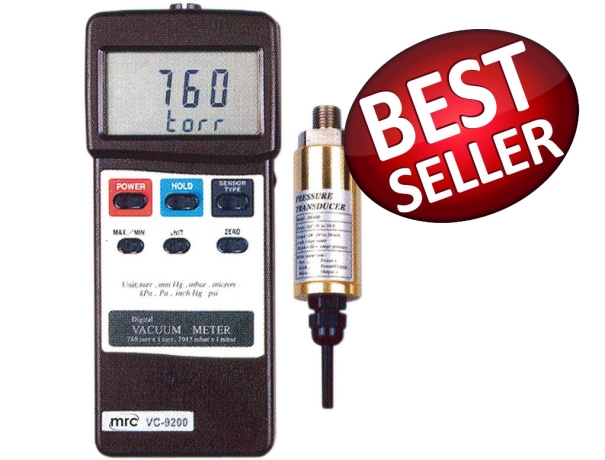
        VC-9200_

        Vacuum meter, 1-1500 mbar

        1
        VACUUM METER AND RECORDER
        VC-9210SD

        VACUUM METER AND RECORDER

        1
        VD6, VSP63MA4, 2m-cable, 1000-1e-4mbar, 230V
        VD64P230

        VD6, VSP63MA4, 2m-cable, 1000-1e-4mbar, 230V

        1
        Piezo, 1600-1 mbar, with data logger, USB
        VD81

        Vacuum Meter Piezo, Data Logger, 1-1600mbar, USB

        1
        Hose nozzle, nickel coated brass, G1/4 male thread
        VD81SW1

        Hose nozzle, nickel coated brass, G1/4 male thread

        1
        Pirani, 100-5e-4 mbar, with data logger, USB
        VD83

        Vacuum Meter Pirani, Datalogger 100 up to 5e-4 mbar,USB

        1
        Pirani extern, 100-1e-3 mbar, with data logger, USB
        VD84-1

        Vacuum Meter external Pirani, Datalogger, 100 up to 1e-3 mbar,USB

        1
        Pirani extern, 100-1e-3 mbar, with data logger, USB
        VD84-2

        Vacuum Meter external Pirani, Datalogger, 100 up to 1e-3 mbar

        1
        Piezo + Pirani, 1200-5e-4 mbar, with data logger, USB
        VD85

        Piezo + Pirani, 1200-5e-4 mbar, with data logger, USB

        1
        VD12, VSR53D, 2m cable, 1200-1e-4 mbar
        VD1253P

        VD12, VSR53D, 2m cable, 1200-1e-4 mbar

        1
        MUNRO- Laboratory Equipment UK

        BLOGS

        ABOUT US

        ABOUT US

        CONTACT US

        CONTACT US

        SERVICE CENTER

        CENTRE

        • ABOUT
        • |
        • PRODUCTS
        • |
        • CATALOGUES
        • |
        • SUPPORT
        • |
        • CENTRE
        • |
        • CUSTOMERS
        • |
        • Privacy Policy
        • |
        • TERMS
        • |
        • FAQ
        • |
        • BLOGS

        [email protected]
        UK: Cavendish House, Parkway, Harlow Business Park, Harlow, Essex CM19 5QF UK

        • Bsmart בניית אתרים
        • SAP
        altImg

        • Fully Supported on Chromee*
        • Color Blind Adjusted
        • Heavy Vision Adjusted
        • Regular Display
        • Access Keys MenuAlt + 0
        • Stop Motion
        • Remove Underline Links
        • Press Keys For View Resize
        • Ctrl + Larger
        • Ctrl - Smaller
        • Ctrl 0 Reset Size
        • Enable Disable Keyboard Focusing
        • Reset All To Defualt

        Access Keys

        • Enable/Disable This MenuAlt + 0
        • Skip To Main MenuAlt + 1
        • Skip To Main ContentAlt + 2
        • דלג למפת אתר מונגשת Alt + Shift + 3
        • SearchAlt + 4
        • Contact PageAlt + 7
        • דלג למפת העמוד Alt+5
        • Skip To HomepageAlt + h
        • Skip To Accessibilty MenuAlt + m

        *Firefox users: Use Alt + Shiftnumber

        In order to move between elements, Press - Tabkey, To backtrack press, - Shift + Tab

      • Skip To Main Menu
      • Skip To Main Content
      • Skip To Accessbilty Menu
      • This website uses cookies for the purpose of ongoing and proper operation in accordance with the privacy policy